Poster presenters are expected to print and bring their physical poster to the poster hall for display and presentation on their assigned day.
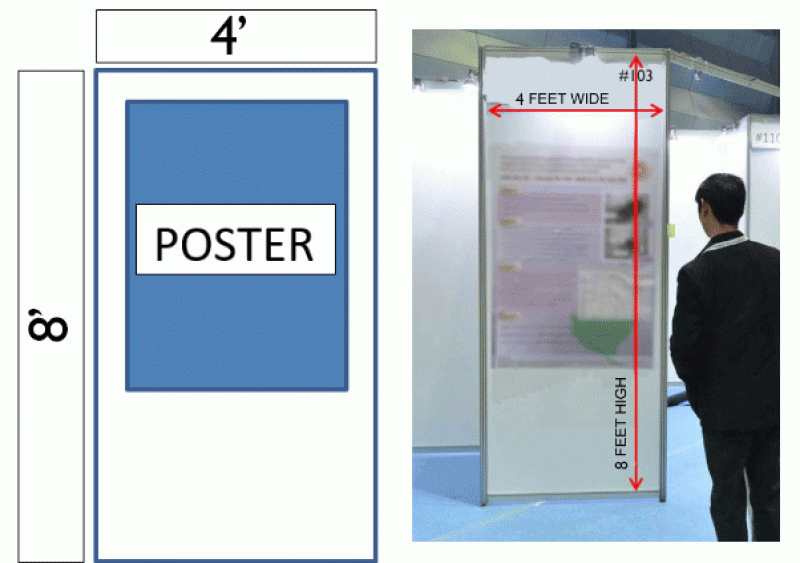
The board will be used VERTICALLY. Maximum dimensions of the poster board are 8 feet high x 4 feet wide. Posters should be created smaller than the maximum dimensions. Please see below for a recommended poster dimensions.
Here is the actual printed poster dimensions are 5 feet high x 3 feet wide.
All presenters must pre-register for the meeting and pay the appropriate registration fee by the presenter registration deadline of Jan 15, 2026. Note: IADR membership and meeting registration are separate fees. Failure to register by Jan 15, 2026 will result in the following:
You will not be allowed to present and your abstract will be withdrawn from the online Scientific Program and program materials.
The abstract will not be citable as being part of the Special Issue of the Journal of Dental Research.
What is a Presentation Preview?
All registered accepted presenters are required to upload a preview of their presentation for inclusion in the IADR Abstract Gallery in the online scientific program. Preview files must be uploaded as a PDF file less than 10 MB in size. (Compress your PDF here). This preview should not be your entire poster. It is meant to be a unique snapshot of your research to encourage people to visit your poster during your scheduled presentation time, similar to a trailer for a movie.
This preview is only to complement the abstract in the IADR Abstract Gallery online scientific program and app. It is in no way connected to your in-person presentation and will not be available onsite outside the mobile app. You will not have access to this upload at the time of your live presentation.
Submission Deadline is March 11, 2026 at 11:59 p.m. EDT (UTC -5).
How do I submit this Preview?
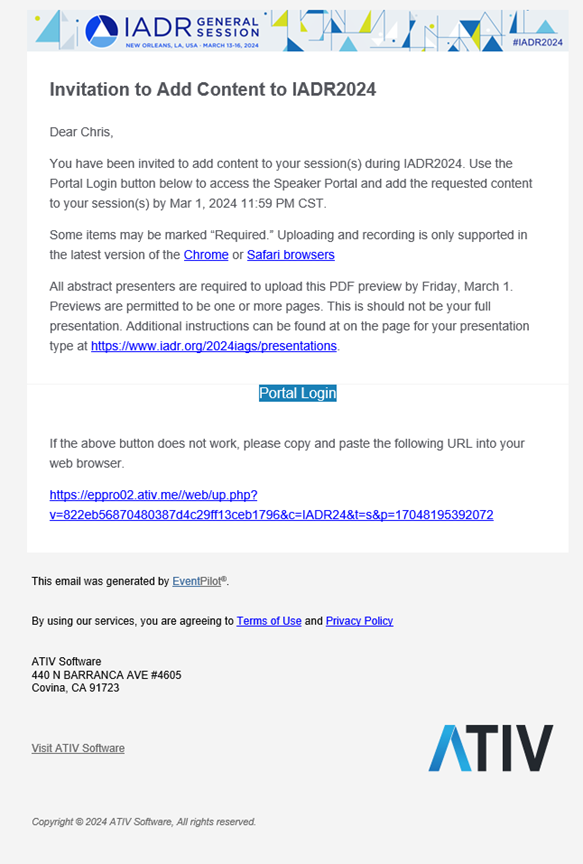
A separate notification will be sent in Late-February from alerts@ativsoftware.com with upload instructions for the required presentation preview PDF. Note this email contains a unique link to you as a presenter that should not be shared.
If you did not receive this unique email link, email @email to have it resent.
The email looked like the below:
Saving Presentation Preview as PDF
Depending on the program you use to create your presentation preview, instructions may vary. There are 2 options when saving a presentation as a PDF.
If you have any interactive material on the slides, such as links meeting delegates can click, be sure to do the following:
Find the “Save As” option in the menu if it exists. In the file type dropdown, select PDF (.pdf).
If there is no PDF options in “Save As” you may need to Export the presentation as a PDF. Find the Export option and selection the option to create an Adobe PDF.
If you do not have links, you can also save as PDF in the following way:
In the program, find the print function
In the printer selection dropdown, select “Save as PDF”
*Programs vary in instructions. If using a design platform provided by your institution and the above instructions do not provide an option for creating a PDF of the presentation preview, we ask that you get instructions from your institution for that design program.
Additional Upload Portal Details
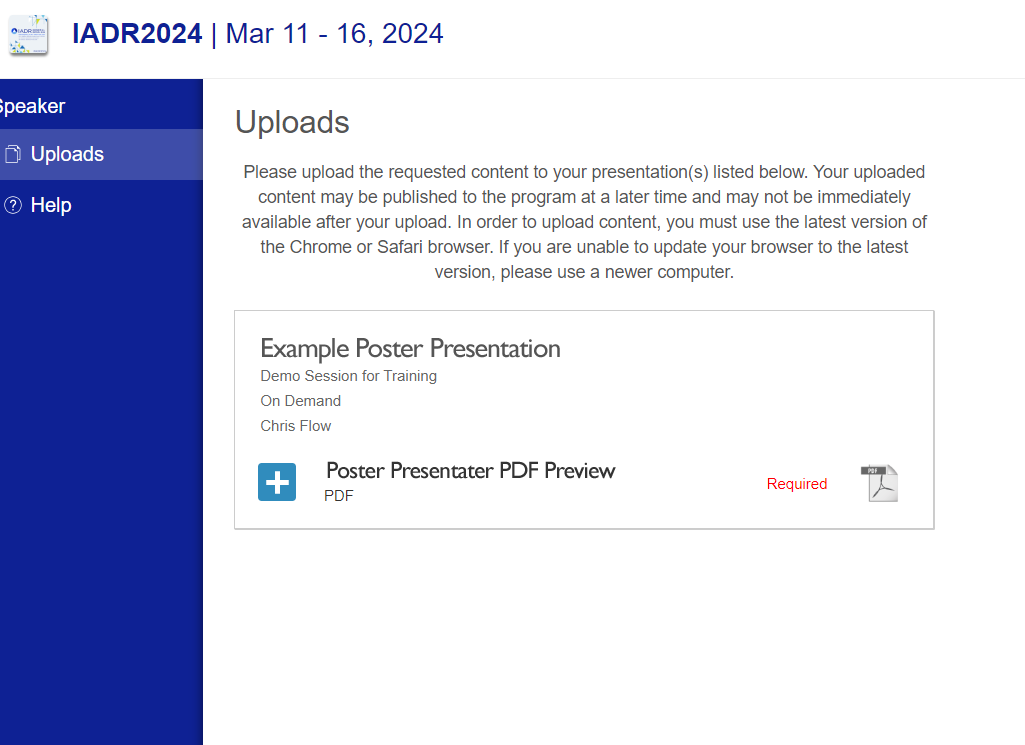
Once in the ATIV speaker preview upload system, you will see your abstract title next to the date and session title. To upload your PDF, click the blue + box and follow the instructions to locate and upload your file.
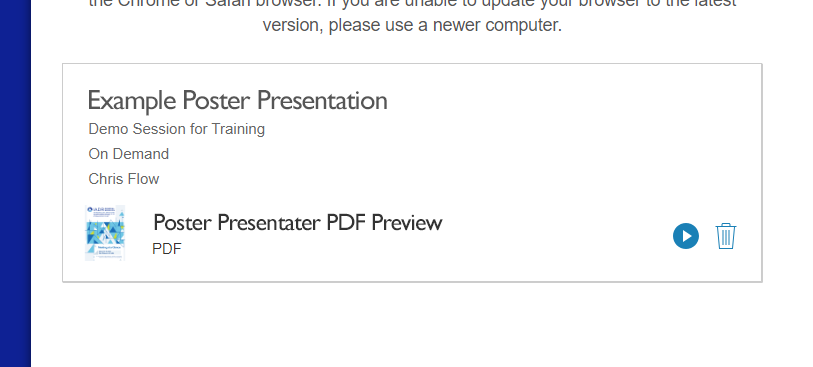
Once uploaded, the page will reload and you will see a preview icon of your PDF in place of the blue + icon and on the right there will be a ▶ button. Click the ▶ to open the PDF. If the PDF displays, the upload was successful. Note that the PDF preview will not be shown in your presentation within the app or online platform for up to 24 hours after the upload.
Poster presenters are expected to print and bring their physical poster to the poster hall for display and presentation on their assigned day.
The board will be used VERTICALLY. Maximum dimensions of the poster board are 8 feet high x 4 feet wide. Posters should be created smaller than the maximum dimensions.
Presentation number of the abstract, title and author(s) must be included on the poster.
Include your Final Presentation/Poster # in the top right corner of your printed poster. The Final Presentation/Poster # should be large enough for delegates to easily find your presentation as they are walking down the poster aisles in the hall. Your Final Presentation/Poster # is different from your 7-digit Abstract Submission ID. Your Final Presentation/Poster # represents the physical board number for your poster.
The presentation must cover the same material as the abstract submitted but does not need to include the submitted abstract.
First Time Presenter?
If you are a first-time presenter, we encourage you to download the first-time presenter graphic on this page and print it on your poster so people know and can welcome you.
Poster Design Tips
Avoid dark background for text boxes. Dark text on white is the easiest for most people to read.
Make sure that details on graphs and photographs can be comfortably viewed from 6 feet away.
Briefly describe procedures and materials. Define all trade names first then use generic names throughout. All compounds and drugs must be identified.
Please do not write or paint on the poster board. Attach a small photograph of yourself to the poster so other participants can recognize you as the presenter.
A series of typewritten sheets attached to the poster board is not an acceptable poster.
When you arrive at the San Diego Convention Center your first stop should be registration to pick up your badge. Registration is located in Hall F-G Foyer.
Registration Hours:
Tuesday, March 24, 2026 | TBD Wednesday, March 25, 20265 | 7 a.m. - 5 p.m. Thursday, March 26, 2026 | 7 a.m. - 5 p.m. Friday, March 27, 2026 | 7 a.m. - 5 p.m. Saturday, March 28, 2026 | 7 a.m. - 5 p.m.
When receiving badge at registration, presenters should secure a Poster Presenter ribbon corresponding with the day of presentation to wear during the meeting. This ribbon will allow presenters access to the poster hall to set up and tear down posters when the hall is closed. You will not be allowed entrance into the hall without the proper ribbon.
Materials
Materials will be provided to put the poster on the board. Poster should not be a sticker or self-adhere to the board. Your poster should be able to be easily removed in one piece as you are expected to take it with you during the designated poster removal period. Materials used to hang the poster should not damage the board.
Setup Time
Poster set-up time is 7:15 a.m.- 8 a.m. on the day of your presentation. Poster set-up, tear down and viewing times for each poster session are listed in the times related to poster presentation section at the top of this page.
When you arrive at the exhibit/poster hall during the poster set-up time, you will look for your Final Presentation/Poster # to find your assigned poster board where you will attach your poster. DO NOT remove the number sign, since others will need to use that information to find their poster location throughout the meeting.
Friends and colleagues cannot set up your poster for you.
You must set up and tear down your poster during the designated times. No exceptions will be allowed.
You are required to be at your poster board during the full session time listed above (not the entire poster viewing time). The IADR keeps track of presenters that are not at their poster for the duration of the session.
You must be knowledgeable in your subject and answer questions during your presentation.
If you are both a symposium speaker and a poster presenter at this meeting do not repeat symposium material in your individual presentation.
If applicable, presenters should mention the sponsors of their research in their presentation.
Co-authors and/or mentors may be available to assist in answering questions; however, they may not present the paper.
Presenters who do not present their posters at the meeting will be withdrawn from the program and may be subject to penalty.
Presenters may have copies of their presentation available as handouts or by QR code. This is not mandatory, just an option for the presenter to increase the impact of the presentation.
Posters must remain up until the time specified for tear down: 5 p.m. - 5:15 p.m. on the day of your presentation.
Presenters should promptly remove their posters during the designated poster tear-down time. No exceptions will be allowed.
Any posters left after the tear tear-down period will be removed.
IADR is not responsible for posters and materials left on poster boards after the stated hours.
After your presentation block, you are able to visit the Continuing Education site for the General Session and claim your certificate of attendance, certificate of presentation, and claim CE. This site will be posted on the General Session homepage the week of the meeting. It will be open for 6 months after the conclusion of the General Session.